Software testing has evolved significantly over the years and automation is now an integral part of modern software development. Selenium is one of the most popular tools for browser automation. However, writing Selenium scripts alone is not sufficient to build a professional automation framework. We need another testing framework to control the execution of tests, build reports, organize test cases, manage test data and run tests in parallel. This is where TestNG comes into play in Selenium automation.
Learning TestNG is one of the most valuable skills you can have if you are a beginner in automation testing or an experienced QA engineer trying to improve your framework design. It makes it easier to run tests, helps to organize code and offers powerful features that can save you time and effort in automation.
In this article you will learn all about TestNG Framework in Selenium from scratch to advanced level. Each topic is explained in simple language with practical examples, so it’s easy to follow even if you are just starting out on your automation testing journey.
What is TestNG?
TestNG means Test Next Generation. It is an open source testing framework for Java based application. TestNG, which was inspired by JUnit, has many more features, which make it more suitable to automation testing projects.
Selenium is all about automating web browser activities such as clicking buttons, filling up text and validating web pages. Selenium however does not provide any capability to manage execution of tests or provide detailed reports. This is where TestNG comes in as a test execution framework.
TestNG allows you to create test cases, control the order of execution, group together related tests, generate reports, run tests in parallel and efficiently manage test data.
These features make TestNG one of the most popular frameworks used with Selenium in enterprise automation projects.
Why Do We Need TestNG with Selenium?
Many newbies ask why do they need TestNG when Selenium already automates browser interactions.
The answer is simple, Selenium is for automating browsers and TestNG is for managing test execution.
Let’s say you are testing an e-commerce website which has hundreds of test cases. You want to:
- Run login before each checkout tests
- Run regression tests before every release
- Skip broken dependent tests
- Generate execution reports.
- Run tests on multiple browsers at the same time
Selenium alone can not efficiently meet these requirements. TestNG has all these features and helps us in creating a good structured automation framework.
Features of TestNG Framework
One of the main reasons why TestNG is popular is because of its huge number of features. Such features make automation testing faster, easier to maintain and more scalable.
1. Easy Test Execution
Executing test cases is very simple with TestNG. You can run single test methods, a whole class, or multiple test suites with just a few clicks.
This flexibility makes debugging and maintenance easier during development.
import org.testng.annotations.Test;

public class LoginTest {

   @Test
    public void verifyLogin() {
        System.out.println("Verify Login");
    }

    @Test
    public void verifyTitle() {
        System.out.println("Verify Page Title");
    }
}Output:
Verify Login
Verify Page Title
2. Powerful Annotations
TestNG provides annotations that control the execution flow of your test cases.
Few commonly used annotations include:
- @BeforeSuite
- @BeforeTest
- @BeforeClass
- @BeforeMethod
- @Test
- @AfterMethod
- @AfterClass
- @AfterSuite
These annotations eliminate the need for manually writing setup and cleanup code multiple times.
3. Test Prioritization
In many automation projects, some test cases need to run before others.
For example:
- Login
- Search Product
- Add to Cart
- Checkout
With TestNG priorities, you can manage the execution order without altering your code structure.
import org.testng.annotations.Test;

public class ShoppingTest {

    @Test(priority = 1)
    public void login() {
        System.out.println("1. Login");
    }

    @Test(priority = 2)
    public void searchProduct() {
        System.out.println("2. Search Product");
    }

    @Test(priority = 3)
    public void addToCart() {
        System.out.println("3. Add Product to Cart");
    }

    @Test(priority = 4)
    public void checkout() {
        System.out.println("4. Checkout");
    }
}Output:
1. Login
2. Search Product
3. Add Product to Cart
4. Checkout
In above example in any order test cases are written but all will be executed based on the given priority
4. Dependency Management
The TestNG feature called ‘dependsOnMethods’ ensures that a test method will run only after the completion of another test method. If the dependent method is either skipped or fails, the other test would also be skipped.
Real-Life Example: Purchasing Online.
Assume that a user wants to buy one product. The process consists of:
- Logging in
- Product searching
- Cart creation
- Checking out
Every step is dependent on the previous step’s success.
import org.testng.annotations.Test;

public class ShoppingTest {

    @Test
    public void login() {
        System.out.println("Login Successful");
    }

    @Test(dependsOnMethods = "login")
    public void searchProduct() {
        System.out.println("Product Searched");
    }

    @Test(dependsOnMethods = "searchProduct")
    public void addToCart() {
        System.out.println("Product Added to Cart");
    }

    @Test(dependsOnMethods = {"login", "searchProduct", "addToCart"})
    public void checkout() {
        System.out.println("Checkout Completed");
    }
}Output:
Login Successful
Product Searched
Product Added to Cart
Checkout Completed
5. Test Grouping
TestNG allows for grouping of similar test cases into different categories instead of executing every test case individually. Instead of running every test, you can execute the whole group (for example: Smoke Group, Regression Group, etc.).
Let’s understand this with the help of an example. Consider the following test cases for your application:
- Login
- Search for a Product
- Add the Product to the Cart
- Place Order
- Logout
All of these test cases can be grouped into different groups.
import org.testng.annotations.Test;

public class ShoppingTest {

    @Test(groups = {"Smoke", "Regression"})
    public void login() {
        System.out.println("Login Test");
    }

    @Test(groups = {"Smoke", "Regression"})
    public void searchProduct() {
        System.out.println("Search Product Test");
    }

    @Test(groups = {"Regression"})
    public void addToCart() {
        System.out.println("Add to Cart Test");
    }

    @Test(groups = {"Regression"})
    public void checkout() {
        System.out.println("Checkout Test");
    }

    @Test(groups = {"Smoke"})
    public void logout() {
        System.out.println("Logout Test");
    }
}Running Only the Smoke Tests
Configure testng.xml
<!DOCTYPE suite SYSTEM "https://testng.org/testng-1.0.dtd">

<suite name="Shopping Suite">

    <test name="Smoke Tests">
        <groups>
            <run>
                <include name="Smoke"/>
            </run>
        </groups>

        <classes>
            <class name="testngexamples.ShoppingTest"/>
        </classes>

    </test>

</suite>Output:
Login Test
Search Product Test
Logout Test
6. Data-Driven Testing
It is often necessary to run the same test with different datasets.
The DataProvider feature in TestNG helps in running the same test multiple times with different sets of data rather than repeating the code.
This reduces code redundancy considerably.
Scenario: Login Test
Instead of hardcoding credentials, we’ll read multiple usernames and passwords using @DataProvider.
Step 1: Create a DataProvider
import org.testng.annotations.DataProvider;

public class TestData {

    @DataProvider(name = "loginData")
    public Object[][] getData() {
        Object[][] creds = new Object[][] {

                {"admin", "admin123"},
                {"john", "john123"},
                {"nishant", "test123"}
        };
        return creds;
    }
}Step 2: Use DataProvider in Test Class
import org.testng.annotations.Test;

public class LoginTest {

    @Test(dataProvider = "loginData", dataProviderClass = TestData.class)
    public void login(String username, String password) {

        System.out.println("Username: " + username);
        System.out.println("Password: " + password);
        System.out.println("-----------------------");
    }
}Output:
Username: admin
Password: admin123
-----------------------

Username: john
Password: john123
-----------------------

Username: nishant
Password: test123
-----------------------
7. Parallel Test Execution
Testing of current applications must be done in several browsers and environments.
The TestNG framework provides Parallel Test Execution by which multiple tests, i.e test methods, classes, or test suites can run at the same time. This facility reduces the time taken for execution.
Real-Time Example
Let’s assume that you have an e-commerce system with a total of four independent test scripts:
- Login Test
- Search Product Test
- Add to Cart Test
- Checkout Test
As these test cases are independent, it allows them to run in parallel.
Step 1: Create Test Class
import org.testng.annotations.Test;

public class ShoppingTest {

    @Test
    public void login() throws InterruptedException {
        System.out.println("Login Test - " + Thread.currentThread().getId());
        Thread.sleep(2000);
    }

    @Test
    public void searchProduct() throws InterruptedException {
        System.out.println("Search Product Test - " + Thread.currentThread().getId());
        Thread.sleep(2000);
    }

    @Test
    public void addToCart() throws InterruptedException {
        System.out.println("Add to Cart Test - " + Thread.currentThread().getId());
        Thread.sleep(2000);
    }

    @Test
    public void checkout() throws InterruptedException {
        System.out.println("Checkout Test - " + Thread.currentThread().getId());
        Thread.sleep(2000);
    }
}Step 2: Configure testng.xml
Run all methods in parallel using 4 threads.
<!DOCTYPE suite SYSTEM "https://testng.org/testng-1.0.dtd">

<suite name="Shopping Suite"
       parallel="methods"
       thread-count="4">

    <test name="Shopping Tests">
        <classes>
            <class name="testngexamples.ShoppingTest"/>
        </classes>
    </test>

</suite>Output:
Add to Cart Test - 35
Login Test - 37
Search Product Test - 38
Checkout Test - 36
Different Parallel Execution Types
| Parallel Type | Description |
|---|---|
| parallel=”methods” | Executes test methods in parallel. |
| parallel=”classes” | Executes different test classes in parallel. |
| parallel=”tests” | Executes tags in parallel. |
8. Parameters in TestNG
The @Parameters annotation in TestNG allows you to pass values from the testng.xml file to your test methods. This is useful when you want to execute the same test with different environments, browsers, URLs, or credentials without modifying your Java code.
Real-Time Example
Suppose you want to run your Selenium test on different browsers.
Step 1: Test Class
import org.testng.annotations.Parameters;
import org.testng.annotations.Test;

public class BrowserTest {

    @Parameters("browser")
    @Test
    public void launchBrowser(String browser) {

        System.out.println("Launching Browser: " + browser);

        if(browser.equalsIgnoreCase("chrome")) {
            System.out.println("Chrome Browser Launched");
        }
        else if(browser.equalsIgnoreCase("firefox")) {
            System.out.println("Firefox Browser Launched");
        }
        else if(browser.equalsIgnoreCase("edge")) {
            System.out.println("Edge Browser Launched");
        }
        else {
            System.out.println("Browser Not Supported");
        }
    }
}Step 2: Configure testng.xml
<!DOCTYPE suite SYSTEM "https://testng.org/testng-1.0.dtd">

<suite name="Browser Suite">

    <parameter name="browser" value="chrome"/>

    <test name="Browser Test">
        <classes>
            <class name="testngexamples.BrowserTest"/>
        </classes>
    </test>

</suite>Output:
Launching Browser: chrome
Chrome Browser Launched
9. Assertions in TestNG
Assertions in TestNG are used to verify whether the actual result matches the expected result. If an assertion passes, the test continues. If it fails, the test is marked as FAILED.
Types of Assertions in TestNG
TestNG provides two types of assertions:
- Hard Assertion
- Soft Assertion
1. Hard Assertion
A Hard Assertion immediately stops the execution of the current test method if the assertion fails.
import org.testng.Assert;
import org.testng.annotations.Test;

public class HardAssertionExample {

    @Test
    public void loginTest() {

        String expectedTitle = "Dashboard";
        String actualTitle = "Dashboard";

        Assert.assertEquals(actualTitle, expectedTitle);

        System.out.println("Login Successful");
    }
}Output:
Login SuccessfulHard Assertion Failure
import org.testng.Assert;
import org.testng.annotations.Test;

public class HardAssertionExample {

    @Test
    public void loginTest() {

        String expectedTitle = "Dashboard";
        String actualTitle = "Home";

        Assert.assertEquals(actualTitle, expectedTitle);

        System.out.println("This line will not execute");
    }
}Output:
FAILED: loginTest
java.lang.AssertionError:
expected [Dashboard] but found [Home]
2. Soft Assertion
A Soft Assertion does not stop the execution when an assertion fails. It collects all failures and reports them only when assertAll() is called.
Example
import org.testng.annotations.Test;
import org.testng.asserts.SoftAssert;

public class SoftAssertionExample {

    @Test
    public void loginTest() {

        SoftAssert softAssert = new SoftAssert();

        softAssert.assertEquals("Home", "Dashboard");

        System.out.println("This line executes even after assertion failure");

        softAssert.assertAll();
    }
}Output:
This line executes even after assertion failure

FAILED: loginTest
java.lang.AssertionError
Commonl Used Assertion Methods
| Assertion Method | Description |
|---|---|
| Assert.assertEquals(actual, expected) | Verifies that two values are equal. |
| Assert.assertNotEquals(actual, expected) | Verifies that two values are different. |
| Assert.assertTrue(condition) | Verifies that a condition is true. |
| Assert.assertFalse(condition) | Verifies that a condition is false. |
| Assert.assertNull(object) | Verifies that an object is null. |
| Assert.assertNotNull(object) | Verifies that an object is not null. |
| Assert.fail() | Explicitly marks the test as failed. |
10. Detailed Reports
TestNG is quite helpful in its ability to generate reports without any manual work.
Types of TestNG Reports
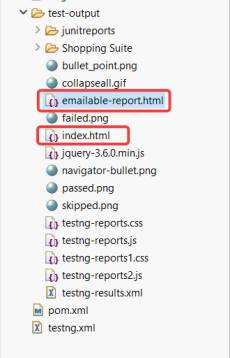
TestNG generates two built-in reports:
- Emailable Report (emailable-report.html)
- Index Report (index.html)
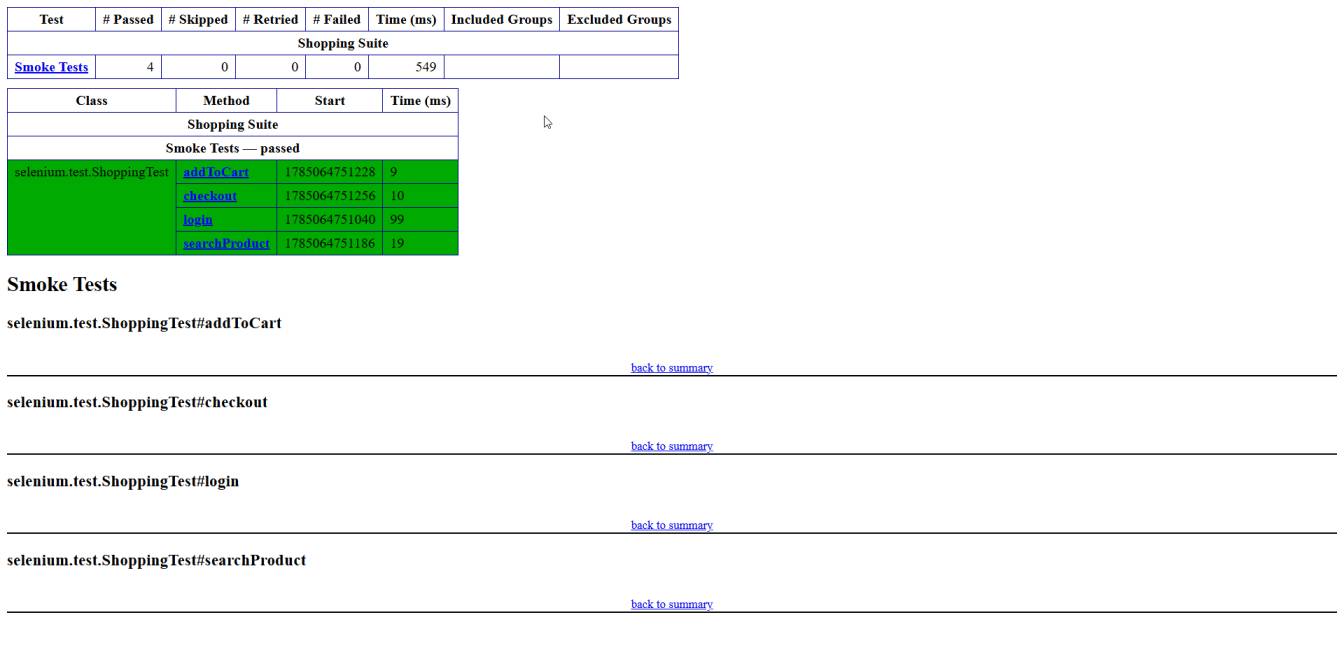
1. Emailable Report
This is a simple HTML report that provides a quick summary of the test execution.
Information Included
- Total Tests
- Passed Tests
- Failed Tests
- Skipped Tests
- Execution Time
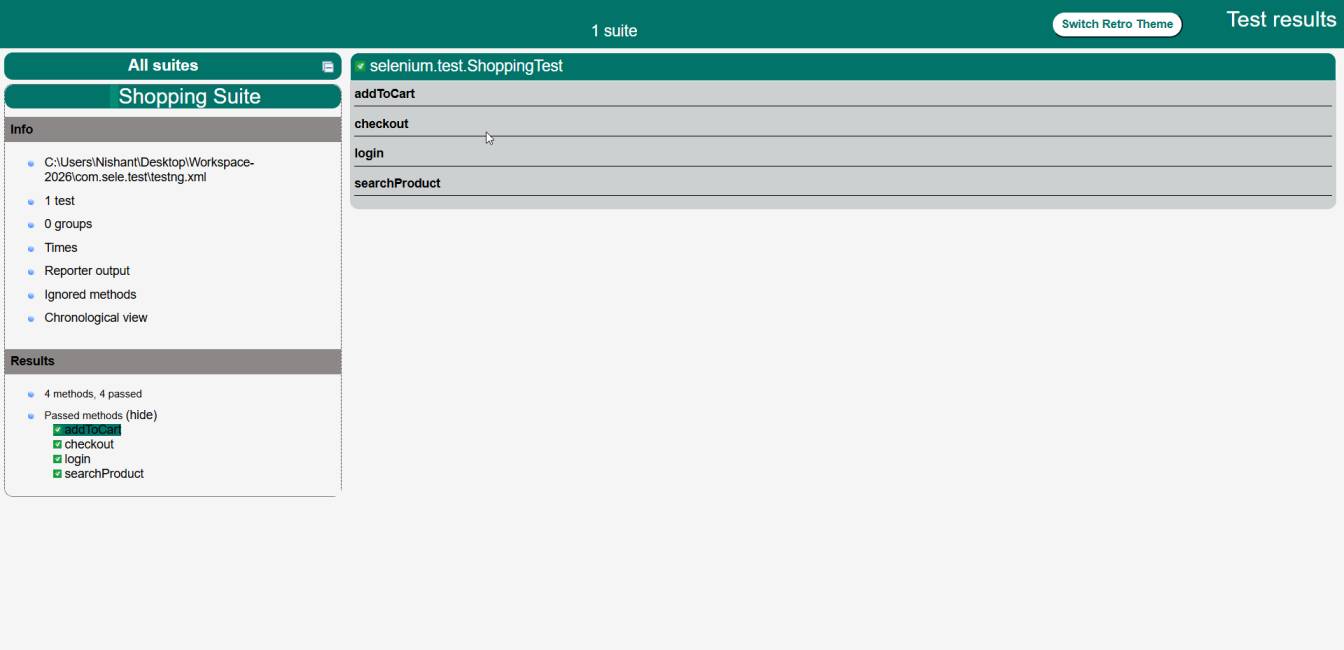
2. Index Report
This is a detailed HTML report generated by TestNG.
It contains:
- Test Suite Details
- Test Classes
- Passed Tests
- Failed Tests
- Exception Stack Trace
- Execution Time
- Groups
- Reporter Output
- Chronological Execution
Summary
TestNG is an advanced testing framework that not only allows you to execute tests but also allows you to develop sustainable Selenium automation systems. Its important functionalities include annotations, assertions, listeners, reporting, DataProviders, and parallel execution.
If you intend to master Selenium technology effectively, understanding its principles will certainly allow you to create cleaner scripts where automated tests can be executed efficiently and that can be successfully implemented in real-life projects.

I’m Nishant Temburnikar, a Software Testing Engineer with 7.5+ years of experience in automation testing and quality engineering. Through CodeToAutomate, I shares practical tutorials, real-world testing insights, and interview preparation resources to help testers build their automation skills and grow their careers.