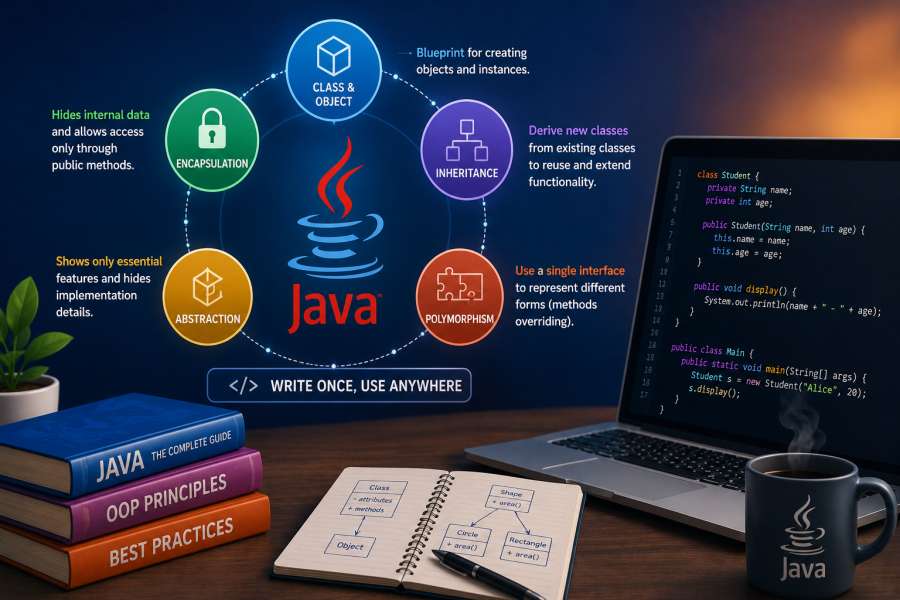
If you’ve started learning Java, you’ve likely come across the term Object-Oriented Programming (OOP) many times. To truly master Object Oriented Programming using Java with practical examples, it’s important to understand the core concepts that make Java one of the most powerful and widely used programming languages in the world. In fact, OOP is one of the key reasons behind Java’s long-standing popularity among developers and enterprises alike.
Java is used to build scalable, maintainable, and reusable software using Object-Oriented Programming in java concepts ranging from simple desktop applications to large enterprise systems. So it is not only important from the interview point of view but also to become a successful Java developer.
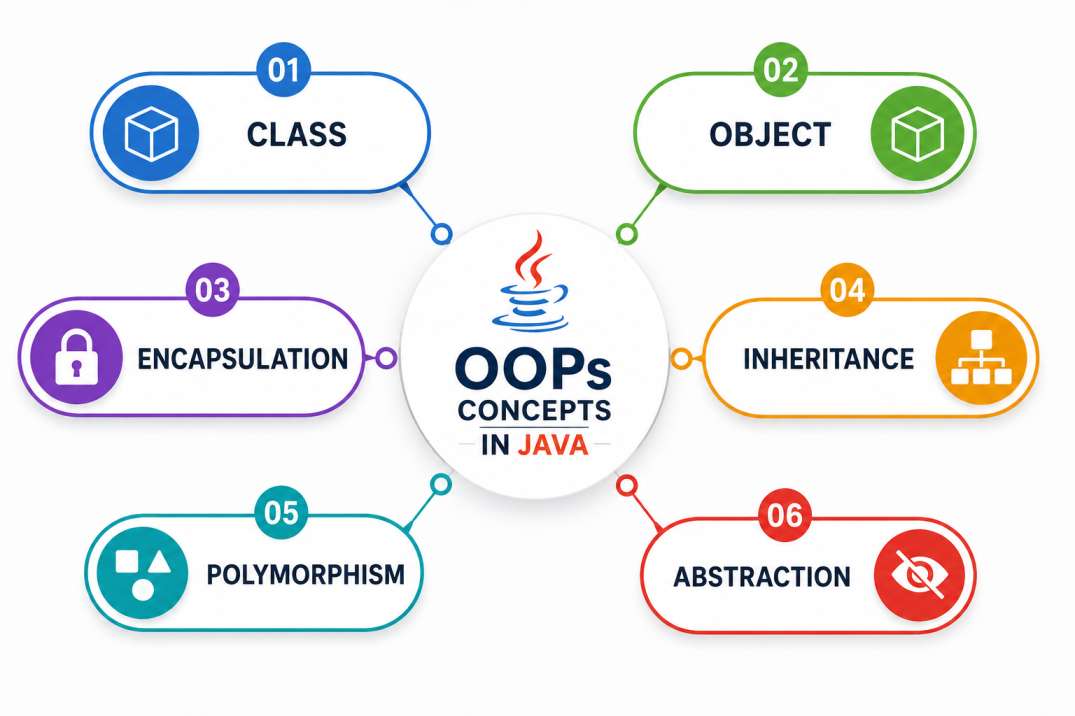
This article will teach you Object-Oriented Programming in Java simply and practically. We will be discussing Classes, Objects, Encapsulation, Inheritance, Polymorphism and Abstraction with examples that make it easy to grasp these concepts.
What is Object-Oriented Programming using Java?
Object-Oriented Programming (OOP) is a programming approach that organizes software around objects rather than functions and procedures.
An entity that has state and behavior is known as object in Java.
Here, State represents properties and Behavior represents actions or functionality.
For example, book, pen, pencil, TV, fridge, washing machine, mobile phone, etc. Objects in Java consists of States or Attributes (called data members) and Behavior (called methods).
For Example a mobile phone has :
Attributes
- Brand
- Color
- Storage
- Model
Behaviors
- Call()
- Message()
- BrowseInternet()
- PlayMusic()
In Object-Oriented Programming, we model these real-world entities as objects and define their characteristics using classes.
This approach makes applications easier to design, maintain, and expand.
Why Do We Need Object-Oriented Programming?
Before OOP became popular, most software applications were developed using procedural programming.
With the growth in size of applications developers started facing issues like:
- Code duplication
- Difficult to maintain
- Poor scalability
- Increased complexity
Object-Oriented Programming addresses these issues by promoting:
- Reusability of code
- Modularity
- Better structuring
- Easy maintenance
- Enhanced security
Hence, almost all the modern software applications use OOP principles.
What is OOP in Java?
Java is based on the concepts of Object Oriented Programming.
Java is all about Classes and objects.
Java allows developers build reusable software components that interact with each other effectively.
Whether you’re building :
Banking applications
E-commerce sites
Hospital management systems
Testing Frameworks for Automation
you will use OOP concepts a lot.
Understanding Classes and Objects in Java
To learn advanced OOP concepts, you need to know the difference between a class and an object.
What is a Class?
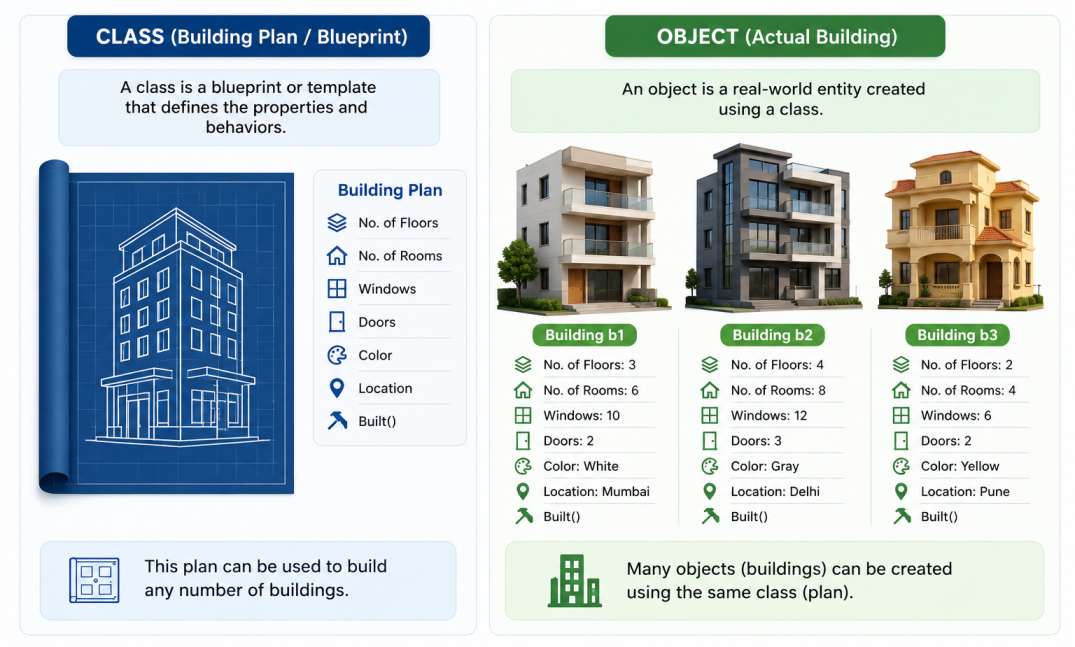
A class is a template to make objects from.
It defines what properties and behavior an object will have.
Think of a class as a blueprint for a house. The blueprint is what the house is supposed to look like, but it is not the house.
What is an Object?
An object is an actual instance of a class.
The real house built using the blueprint which is the object.
Example:
class Building {

    int floors;
    int rooms;
    String color;

    void displayDetails() {
        System.out.println("Floors: " + floors);
        System.out.println("Rooms: " + rooms);
        System.out.println("Color: " + color);
        System.out.println("-------------------");
    }
}

public class BuildingDemo {

    public static void main(String[] args) {

        // Object 1
        Building building1 = new Building();
        building1.floors = 3;
        building1.rooms = 6;
        building1.color = "White";

        // Object 2
        Building building2 = new Building();
        building2.floors = 4;
        building2.rooms = 8;
        building2.color = "Gray";

        // Display details
        building1.displayDetails();
        building2.displayDetails();
    }
}Output:
Floors: 3
Rooms: 6
Color: White
-------------------
Floors: 4
Rooms: 8
Color: Gray
-------------------
Key Point:
Class (Building) = Blueprint/Plan
Object (building1, building2) = Actual buildings constructed from that blueprint
Four Pillars of Object-Oriented Programming
Object-Oriented Programming is based on four fundamental concepts:
- Inheritance
- Polymorphism
- Abstraction
- Encapsulation
Let’s understand all four concept in detail.
1. Inheritance in Java
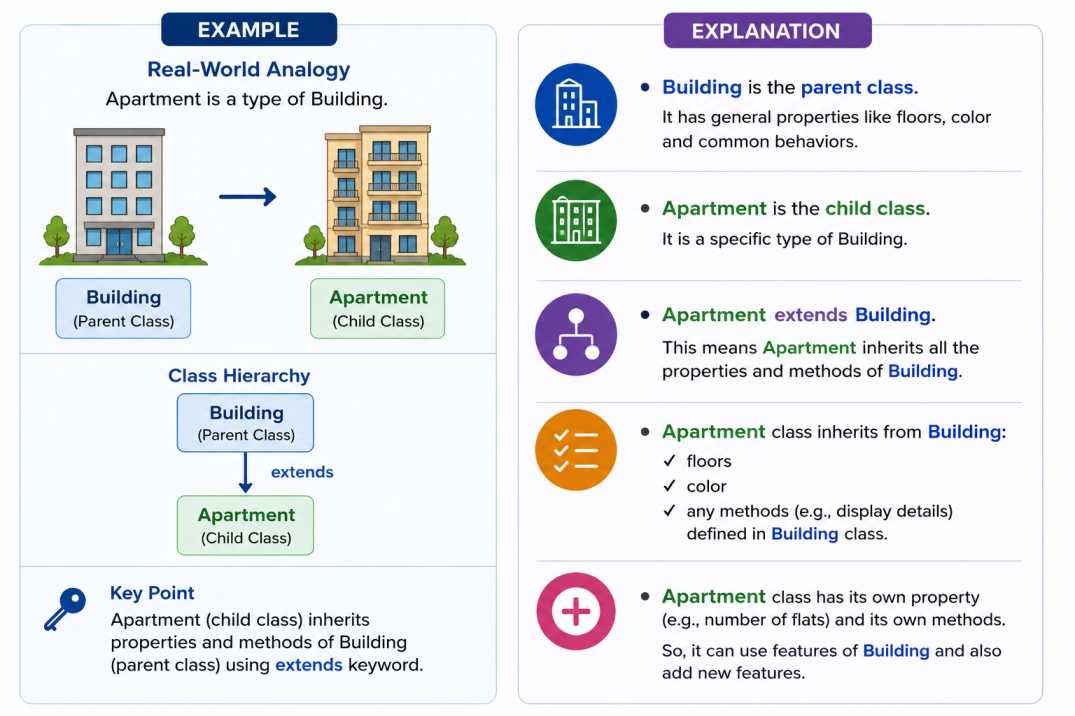
It is a mechanism in Java that allows one class to inherit the properties (fields and methods) of another class.
Inheritance is implemented using extends keyword in Java
If a class is a subclass of another class, then subclass(child class) can inherit the methods and fields of that parent class . And you can also add new fields and methods to your subclass(child class).
On child class object we can call parent class methods and variable but we cannot call child class variable and methods on parent class object
Building – Parent Class
Apartment – Child Class Apartment inherits common properties of a building and adds its own feature.
class Building {

    int floors = 5;
    String color = "White";

    void displayBuildingDetails() {
        System.out.println("Floors: " + floors);
        System.out.println("Color: " + color);
    }
}

// Child Class
class Apartment extends Building {

    int flats = 20;

    void displayApartmentDetails() {
        System.out.println("Number of Flats: " + flats);
    }
}

public class InheritanceDemo {

    public static void main(String[] args) {

        Apartment apartment = new Apartment();

        // Inherited from Building class
        apartment.displayBuildingDetails();

        // Defined in Apartment class
        apartment.displayApartmentDetails();
    }
}Output:
Floors: 5
Color: White
Number of Flats: 20
If you see in above example Apartment class not having the method displayBuildingDetails() but still can call this method on child class object which is apartment this is the concept of Inheritance.
Benefits of Inheritance
- Reusable code
- Faster development
- Better organization
- Easier maintenance
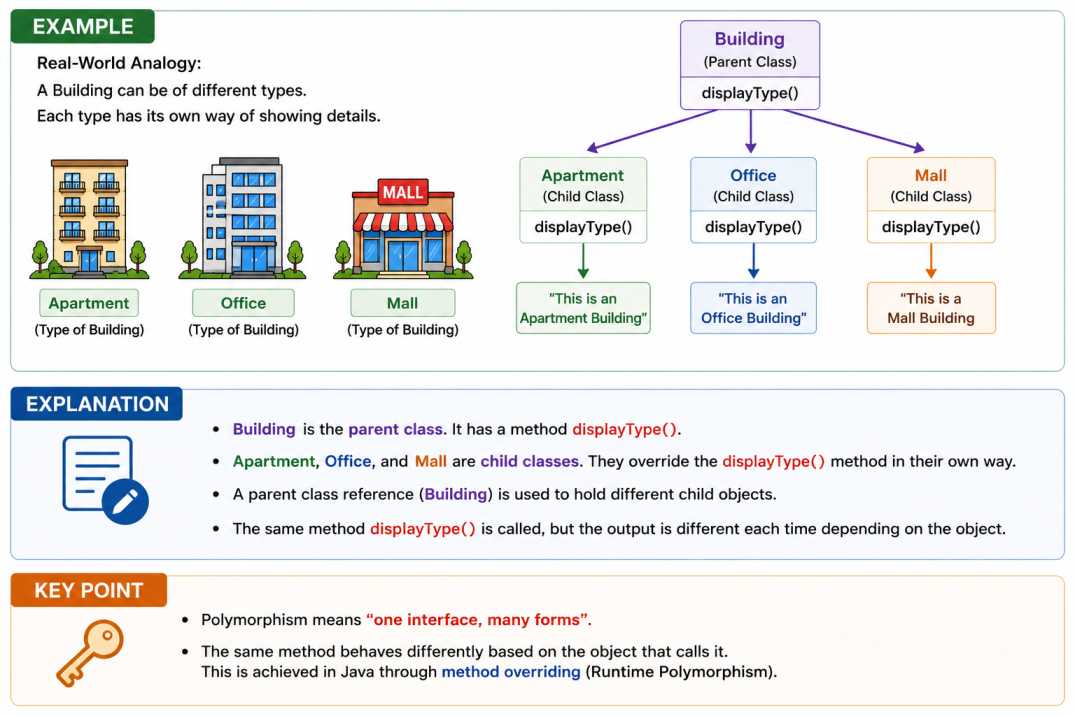
2. Polymorphism
The word polymorphism means having many forms. Polymorphism is derived from 2 Greek words: poly and morphs. The word “poly” means many and “morphs” means forms.
Polymorphism in Java is a concept by which we can perform a single action in different ways mean same method can give different output.
Real-World Example
A person at the same time can have different characteristics. Like a man at the same time is a father, a husband, and an employee. So the same person possesses different behavior in different situations. This is called polymorphism.
class Building {

    void displayType() {
        System.out.println("This is a Building");
    }
}

class Apartment extends Building {

    @Override
    void displayType() {
        System.out.println("This is an Apartment Building");
    }
}

class Office extends Building {

    @Override
    void displayType() {
        System.out.println("This is an Office Building");
    }
}

public class PolymorphismDemo {

    public static void main(String[] args) {

        Building building;

        building = new Apartment();
        building.displayType();

        building = new Office();
        building.displayType();
    }
}Output:
This is an Apartment Building
This is an Office Building
If you see in above example we have called same method displayType() on same Object but giving the different results this is the concept of Polymorphism.
Benefits of Polymorphism
- Flexible code
- Better scalability
- Easier code extension
- Reduced complexity
3. Abstraction in Java
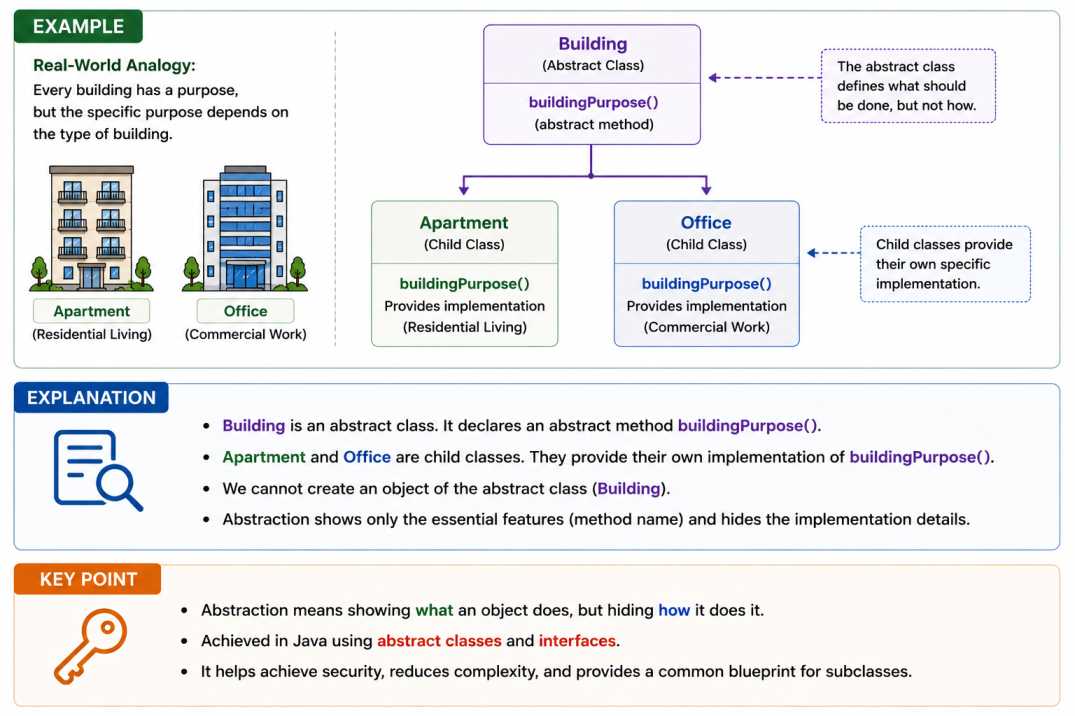
Abstraction is a process of hiding the implementation details and showing only functionality to the user. For example if you are Using an ATM to withdraw money: You interact with an ATM by pressing buttons on a screen to withdraw cash. At the background which internal operations it does, which database queries it called, what network security checks are done, and mechanical bill these all activities are hidden from you.
In Java Abstraction can be achieved with either abstract classes or interfaces.
Real-World Example
A building can provide a common feature like buildingPurpose(), but the exact implementation depends on the type of building.
- Apartment → Residential Purpose
- Office → Commercial Purpose
The parent class only defines what should happen, while child classes define how it happens.
abstract class Building {

    // Abstract Method
    abstract void buildingPurpose();

    // Concrete Method
    void display() {
        System.out.println("Building Information");
    }
}

class Apartment extends Building {

    @Override
    void buildingPurpose() {
        System.out.println("Used for Residential Living");
    }
}

class Office extends Building {

    @Override
    void buildingPurpose() {
        System.out.println("Used for Commercial Work");
    }
}

public class AbstractionDemo {

    public static void main(String[] args) {

        Building building1 = new Apartment();
        building1.display();
        building1.buildingPurpose();

        System.out.println("----------------");

        Building building2 = new Office();
        building2.display();
        building2.buildingPurpose();
    }
}Output:
Building Information
Used for Residential Living
----------------
Building Information
Used for Commercial Work
If you see in above example Building class having the buildingPurpose() abstract method and the Implementation is provided in subclass which extends the Building class which are Apartment and Office.
Benefits of Abstraction
- Cleaner code
- Better security
- Reduced complexity
- Improved maintainability
3. Data Encapsulation in Java
Encapsulation is the process that combines data and code into one unit. It protects both data and code from outside interference and misuse. During this process, data is hidden from other classes and can only be accessed through the public methods of class in which fields and methods are declared. This is why it is also referred to as data hiding. Encapsulation serves as a protective wrapper that stops outsiders from accessing the code and data. Access is managed through a clear interface.
To achieve encapsulation, variables are declared as private, and public setter and getter methods are provided to modify and view the variable values.
Real-World Scenario
A building’s details such as the number of floors and color should not be directly accessible from outside the class. Instead, they should be accessed through public methods.
This is achieved using:
- Private variables (data hiding)
- Getter and Setter methods (controlled access)
class Building {

    // Private variables
    private int floors;
    private String color;

    // Setter methods
    public void setFloors(int floors) {
        this.floors = floors;
    }

    public void setColor(String color) {
        this.color = color;
    }

    // Getter methods
    public int getFloors() {
        return floors;
    }

    public String getColor() {
        return color;
    }
}

public class EncapsulationDemo {

    public static void main(String[] args) {

        Building building = new Building();

        // Setting values using setters
        building.setFloors(5);
        building.setColor("White");

        // Accessing values using getters
        System.out.println("Floors: " + building.getFloors());
        System.out.println("Color: " + building.getColor());
    }
}Output:
Floors: 5
Color: White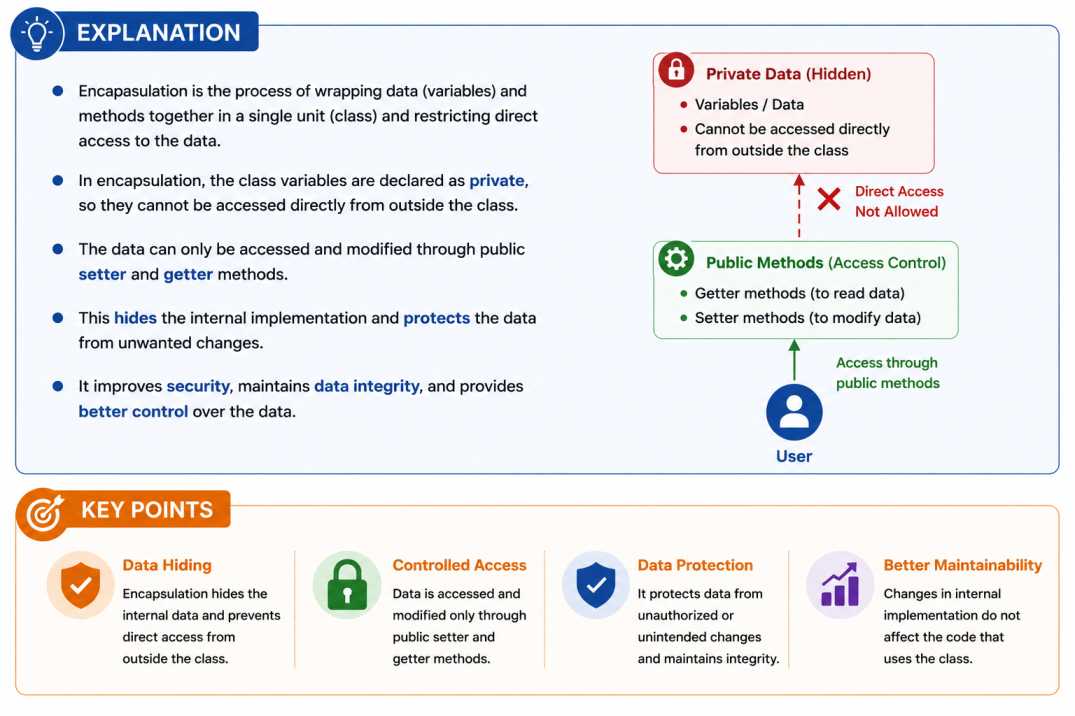
Benefits of Encapsulation
- Improved security
- Better data protection
- Easier maintenance
- Reduced dependencies
Advantages of Object-Oriented Programming Using Java
Object-Oriented Programming offers several benefits.
Code Reusability
Inheritance allows developers to reuse existing code.
Better Security
Encapsulation protects critical data from unauthorized access.
Easier Maintenance
Changes can be made without impacting the whole application.
Scalability
Applications can grow without becoming hard to manage.
Improved Productivity
Developers spend less time writing repetitive code.
Common Mistakes Beginners Make While Learning OOP
Many beginners struggle because they:
Memorize definitions without understanding concepts.
Skip practicing examples.
Ignore real-world scenarios.
Focus only on theory.
The best way to learn OOP is by creating small projects and applying each concept practically.
Best Practices for Learning OOP in Java
If you’re new to Java, follow these recommendations:
Start with classes and objects.
Practice on learned concept.
Learn one OOP concept at a time.
Build mini projects regularly.
Understand the “why” behind each concept.
Consistent practice will help you master OOP much faster than just reading theory.
Conclusion
Object-Oriented Programming is the foundation of Java development. Understanding classes, objects, encapsulation, inheritance, polymorphism, and abstraction helps developers to create software that is organized, reusable, and easy to maintain.
Whether you’re preparing for Java interviews, learning programming, or building real-world applications, mastering Object-Oriented Programming using Java is a skill that will benefit you throughout your career.
Start by learning classes and objects, then gradually explore the four pillars of OOP. With regular practice and hands-on coding, you’ll develop a strong understanding of Java and become a more confident developer.

I’m Nishant Temburnikar, a Software Testing Engineer with 7.5+ years of experience in automation testing and quality engineering. Through CodeToAutomate, I shares practical tutorials, real-world testing insights, and interview preparation resources to help testers build their automation skills and grow their careers.